Send QA build events to Astra Scout
Configure the QA build of an iOS or Android app so Astra Scout receives and checks its Amplitude events while testers run flows.
Astra Scout checks the Amplitude events an app sends while a flow runs. To receive them, the QA build must send its events to Astra Scout on the tester's Mac instead of to Amplitude. App developers configure this in the QA build; the release build stays as it is.
Before you start
- The app uses an Amplitude SDK: the Swift SDK or the older iOS SDK, the Kotlin SDK on Android.
- The project has a build configuration and a scheme for QA, for example
DevorQA. - A Mac with Astra Scout installed, to check the result.
The project has no QA configuration yet
In the Project navigator, select the project. In the editor's left column, select the project under PROJECT, then open the Info tab.
Click + below the Configurations list, choose Duplicate "Debug" Configuration and name it
QA.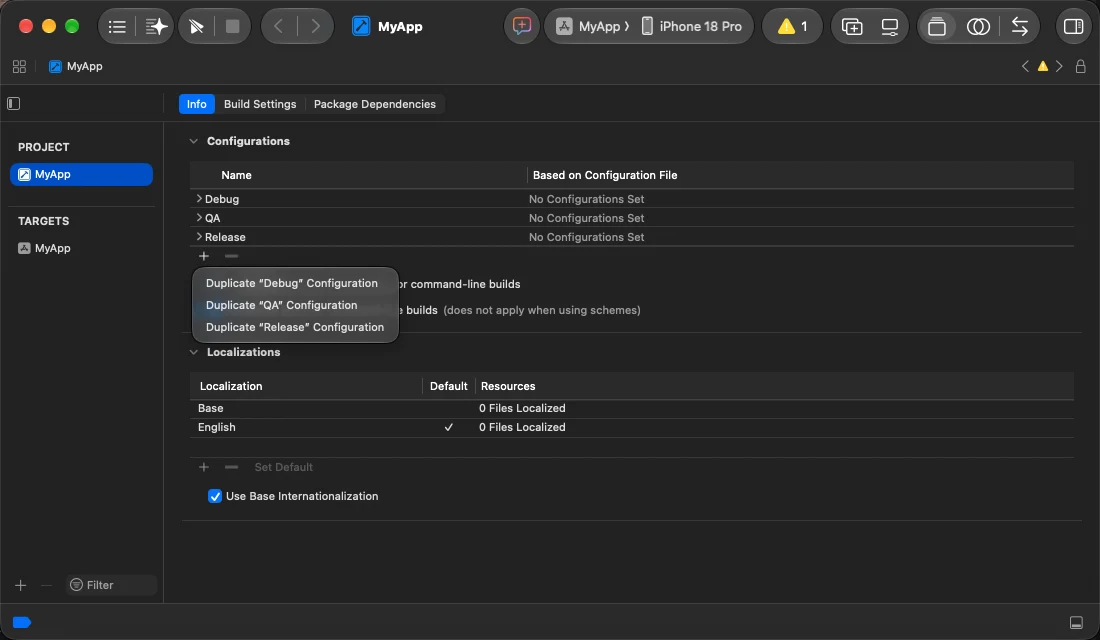
Choose Product → Scheme → Edit Scheme…, click Duplicate Scheme and name it, for example
MyApp QA.In the new scheme, select Run, then the Info tab, and set Build Configuration to
QA. Do the same for Archive.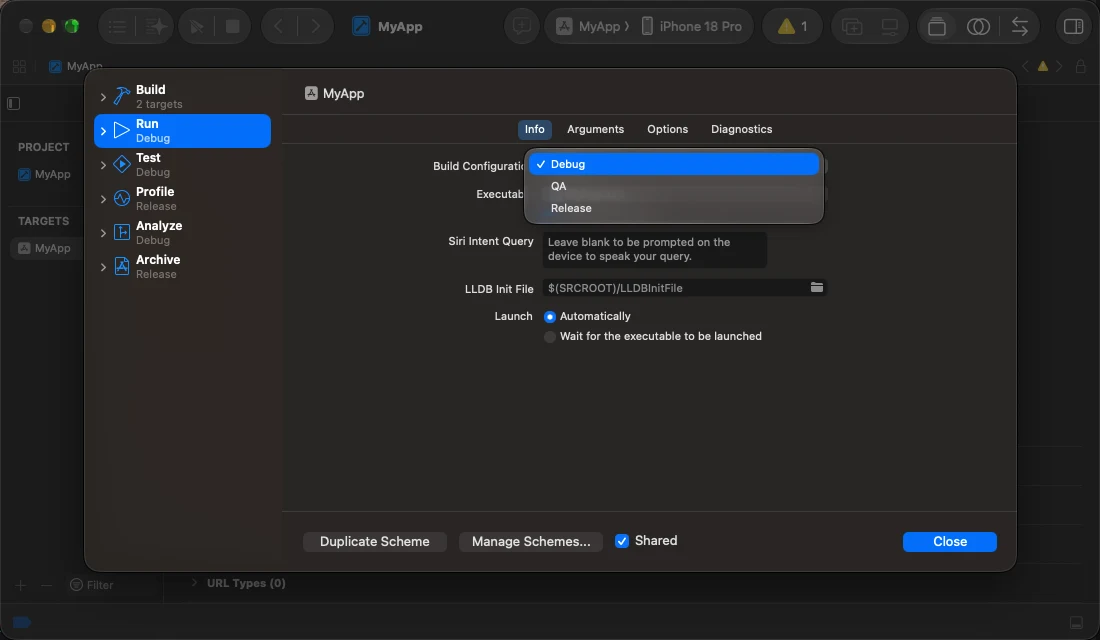
How it works
The Amplitude SDK sends events to the address in its serverUrl option. Astra Scout receives events through the same API as Amplitude, so the QA build only changes serverUrl.
Astra Scout's address differs on each Mac, and between a simulator and an iOS device, so the app does not hard-code it. Each time a flow opens the app with launchApp, Astra Scout passes the address in the launch argument scoutServerUrl, iOS stores it in UserDefaults, and the QA code reads it as serverUrl.
One QA build works for every tester and every Mac. The full form of the address is under Details.
1. Mark the QA build with AMPLITUDE_SERVER_URL
Create the setting AMPLITUDE_SERVER_URL: set in the QA configuration, empty in Staging and Production. The code in step 2 only reads scoutServerUrl when this setting has a value, so the release build never sends events to Astra Scout.
In the Project navigator, select the project, then the app's target under TARGETS.
Open the Build Settings tab and choose All.
Click + to the left of Basic, choose Add User-Defined Setting, and name it
AMPLITUDE_SERVER_URL.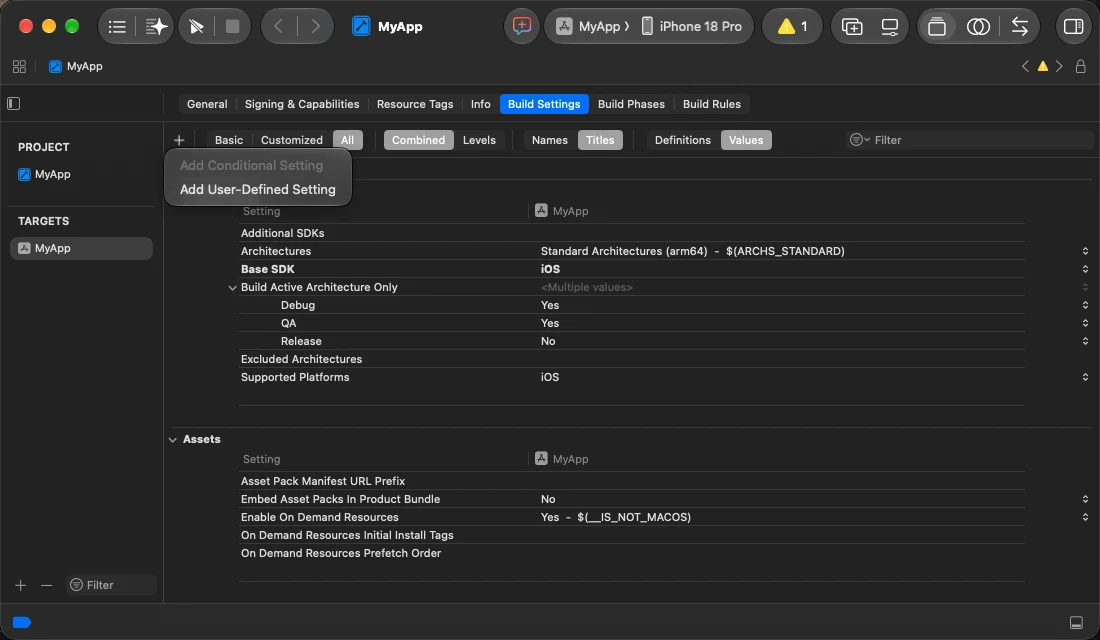
The new setting is in the User-Defined group. Click the triangle left of its name to show each configuration. Double-click the value column on the QA row and enter
http://127.0.0.1:5051/2/httpapi. Leave the other rows empty.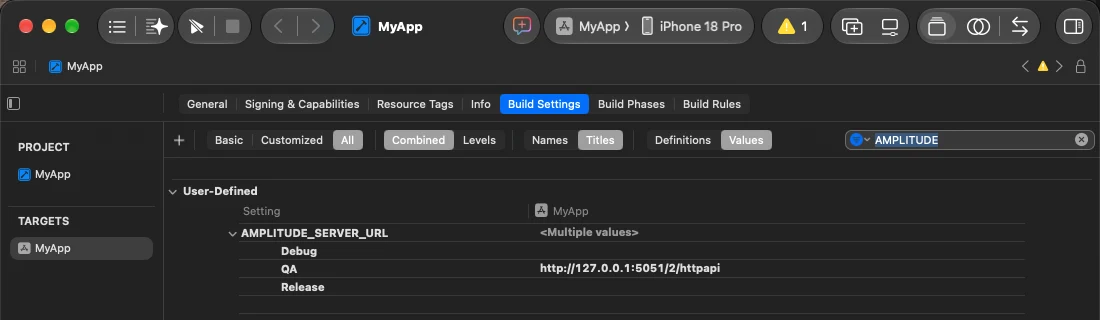
Open the Info tab. In Custom iOS Target Properties, hover over a row, click + and add:
Key Type Value AMPLITUDE_SERVER_URLString $(AMPLITUDE_SERVER_URL)
The value http://127.0.0.1:5051/2/httpapi is also the fallback address: the app uses it when opened by hand on a simulator. When Astra Scout opens the app, scoutServerUrl replaces it.
The project keeps build settings in xcconfig files
Instead of steps 3 and 4, add this line to the QA configuration's xcconfig:
AMPLITUDE_SERVER_URL = http:/$()/127.0.0.1:5051/2/httpapiand AMPLITUDE_SERVER_URL = to the Staging and Production files. In an xcconfig, // starts a comment. The empty $() between the two slashes keeps them apart, and Xcode resolves the value to http://127.0.0.1:5051/2/httpapi. Step 5 stays the same.
2. Read scoutServerUrl when Amplitude starts
With the Amplitude Swift SDK:
var serverUrl = Bundle.main.object(forInfoDictionaryKey: "AMPLITUDE_SERVER_URL") as? String ?? ""
if !serverUrl.isEmpty,
   let scout = UserDefaults.standard.string(forKey: "scoutServerUrl"), !scout.isEmpty {
    serverUrl = scout
}

let configuration = serverUrl.isEmpty
    ? Configuration(apiKey: apiKey)
    : Configuration(apiKey: apiKey, flushQueueSize: 1, flushIntervalMillis: 1000, serverUrl: serverUrl)
let amplitude = Amplitude(configuration: configuration)
NSLog("[Amplitude] serverUrl = %@", serverUrl.isEmpty ? "Amplitude" : serverUrl)- Staging and Production have an empty
AMPLITUDE_SERVER_URLand keep their Amplitude setup. flushQueueSize: 1andflushIntervalMillis: 1000send each event as it happens. With the defaults, the SDK batches events and they reach Astra Scout after the step that caused them.- The
NSLogline writes the address in use to the system log, for the check in step 5. Do not useprint: when Astra Scout opens the app,printoutput goes nowhere.
With the older Amplitude iOS SDK: Amplitude.instance().setServerUrl(serverUrl) and eventUploadThreshold = 1.
3. Allow HTTP on the local network
Astra Scout receives events over http://. The QA build needs two keys in its Info.plist:
| Key (name shown in Xcode) | Type | Value |
|---|---|---|
App Transport Security Settings → Allows Local Networking (NSAllowsLocalNetworking) | Boolean | YES |
Privacy - Local Network Usage Description (NSLocalNetworkUsageDescription) | String | QA builds send analytics events to Astra Scout on the local network. |
- Allows Local Networking allows
http://connections to127.0.0.1and.localaddresses. - Privacy - Local Network Usage Description is the text of the Local Network permission prompt on an iOS device. If the tester chooses Don't Allow, the app keeps its events and never sends them.
In the Info tab, under Custom iOS Target Properties:
- Add the key App Transport Security Settings (type Dictionary) if it is not there.
- Click its triangle to open it, click + on that row and add the child key Allows Local Networking =
YES. - Add the key Privacy - Local Network Usage Description with the text from the table.
The result of step 1 and step 3:
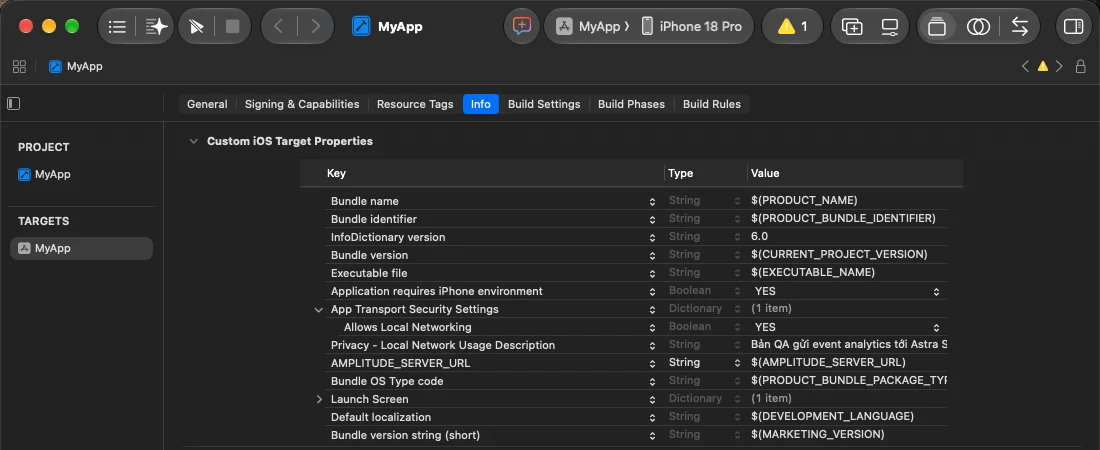
The Info tab applies to every configuration, the App Store build included. If the app uses the local network for nothing else, the App Store build never connects to it, iOS never asks for the permission, and the two keys have no effect there.
Keep the two keys in the QA build only
Instead of adding them in the Info tab:
- Create
Info-QA.plistin the target's folder: File → New → File from Template… → Property List. - Open it and add the two keys.
- In Build Settings, find Info.plist File, click the triangle to show each configuration, and set the QA row to the path of
Info-QA.plist. Leave the Staging and Production rows as they are.
If the project generates its Info.plist (Generate Info.plist File = Yes), Xcode merges the keys from Info-QA.plist into the QA configuration's Info.plist.
4. Build for the simulator and the iOS device
A simulator and an iOS device need separate builds, from the same code.
| Simulator | iOS device | |
|---|---|---|
| File | .app, zipped to send | .ipa |
| Signing | None | Development or Ad Hoc |
| Requirement | The tester's iOS device UDID is in the provisioning profile |
Simulator build:
xcodebuild -scheme <QA scheme> -configuration <QA configuration> -sdk iphonesimulator \
  -derivedDataPath build build
The app is at build/Build/Products/<QA configuration>-iphonesimulator/<App>.app.
iOS device build: Product → Archive with the QA scheme, then Distribute App → Custom → Release Testing (Ad Hoc) or Debugging (Development). TestFlight and App Store builds do not work, because clearState reinstalls the app from the build.
Testers send their iOS device UDID (shown in Xcode → Window → Devices and Simulators); add it to the Apple Developer account before building. How to hand the builds to testers: Share builds with testers.
5. Check
In Astra Scout, connect a simulator.
Upload the
.appas Share builds with testers describes. Choose Window → Builds, select the build and click Install on and the simulator name.Run a flow with
launchApp:yamlappId: com.example.app --- - launchAppOpen Window → Tracking (
Shift+Cmd+T). It lists the events the app just sent.
If the window says "No Amplitude event captured.", check the address the app uses. Run this in Terminal, then run the flow again:
xcrun simctl spawn booted log stream --predicate 'eventMessage CONTAINS "[Amplitude]"'The line [Amplitude] serverUrl = http://127.0.0.1:5051/d/… means the app received Astra Scout's address. Other cases are under Troubleshooting.
Repeat with the .ipa build on an iOS device, and choose Allow when the app asks for Local Network access.
Android
Astra Scout does not pass scoutServerUrl to Android apps yet. The Android QA build uses a fixed address:
| Where the app runs | serverUrl |
|---|---|
| Emulator | http://10.0.2.2:5051/2/httpapi |
| Android device on USB | http://127.0.0.1:5051/2/httpapi, after running adb reverse tcp:5051 tcp:5051 on the Mac |
| Device over Wi-Fi | http://<Mac IP>:5051/2/httpapi, with the device and the Mac on the same Wi-Fi. <Mac name>.local only works on Android devices that resolve .local names |
In the app module's build.gradle.kts, set the address for the QA build type and leave it empty in the others:
android {
    buildFeatures { buildConfig = true }
    buildTypes {
        getByName("debug") {   // the build type used for QA
            buildConfigField("String", "AMPLITUDE_SERVER_URL", "\"http://10.0.2.2:5051/2/httpapi\"")
        }
        getByName("release") {
            buildConfigField("String", "AMPLITUDE_SERVER_URL", "\"\"")
        }
    }
}
When creating Amplitude:
val scoutUrl = BuildConfig.AMPLITUDE_SERVER_URL.ifEmpty { null }
val amplitude = Amplitude(Configuration(
    apiKey = apiKey,
    context = applicationContext,
    serverUrl = scoutUrl,                              // null: send to Amplitude as usual
    flushQueueSize = if (scoutUrl != null) 1 else 30,
    flushIntervalMillis = if (scoutUrl != null) 1000 else 30000,
))
Do not pass an empty string as serverUrl: the SDK treats it as an address and the release build stops sending events.
Android 9 and later block http://. In the QA build type, set android:usesCleartextTraffic="true" in the manifest, or use a network_security_config for the addresses above.
ipconfig getifaddr en0 prints the Mac's IP. The Actions menu of the Tracking window also lists these addresses to copy.
Troubleshooting
| Symptom | Cause | Fix |
|---|---|---|
The log says serverUrl = Amplitude | Not the QA build, or Info.plist lacks AMPLITUDE_SERVER_URL | Check the scheme being built and step 1 |
The log says 127.0.0.1:5051/2/httpapi instead of an address with /d/ | The app was not opened by launchApp, or launchApp has stopApp: false | Open the app through a flow; remove stopApp: false |
| No log line at all | The step 2 code did not run, or it uses print instead of NSLog | Check the code that creates Amplitude |
| The simulator works, the iOS device does not | Local Network not allowed, a different Wi-Fi, or Receive events from devices on the network is off | Allow it in Settings → Privacy & Security → Local Network; use the same Wi-Fi; turn the switch back on in Settings → Amplitude |
| Events from an earlier run appear | The SDK queue still holds old events | Delete the app and reinstall it |
The App Store build always sends to Amplitude. Check the tracking of a released build with Look Up a User…, see Amplitude results.
Details
| Device | scoutServerUrl |
|---|---|
| Simulator | http://127.0.0.1:5051/d/<code>/2/httpapi |
| iOS device | http://<Mac name>.local:5051/d/<code>/2/httpapi |
- Astra Scout receives events on port
5051. The path/2/httpapimatches Amplitude's API. - A simulator runs inside the Mac, so it reaches
127.0.0.1. An iOS device reaches the Mac over Wi-Fi by its.localname. <code>is the first 12 characters of the SHA-256 ofscout-device:<UDID>. Astra Scout attaches events with this code only to runs on that device.- Events sent to an address without
/d/<code>are still received and attached to the run in progress, but cannot be told apart by device. - If a flow sets
scoutServerUrlinlaunchApp: arguments:, Astra Scout keeps the flow's value.